# Review and apply record changes (/docs/en/inbox-records)
The **Questions** page at the top of the screen contains record updates and contact suggestions. This page covers **record updates**. Open **Reply drafts** for email drafts, or see [contact suggestions](/docs/en/inbox-actions) for proposed follow-ups.
## Check the proposed change [#check-the-proposed-change]
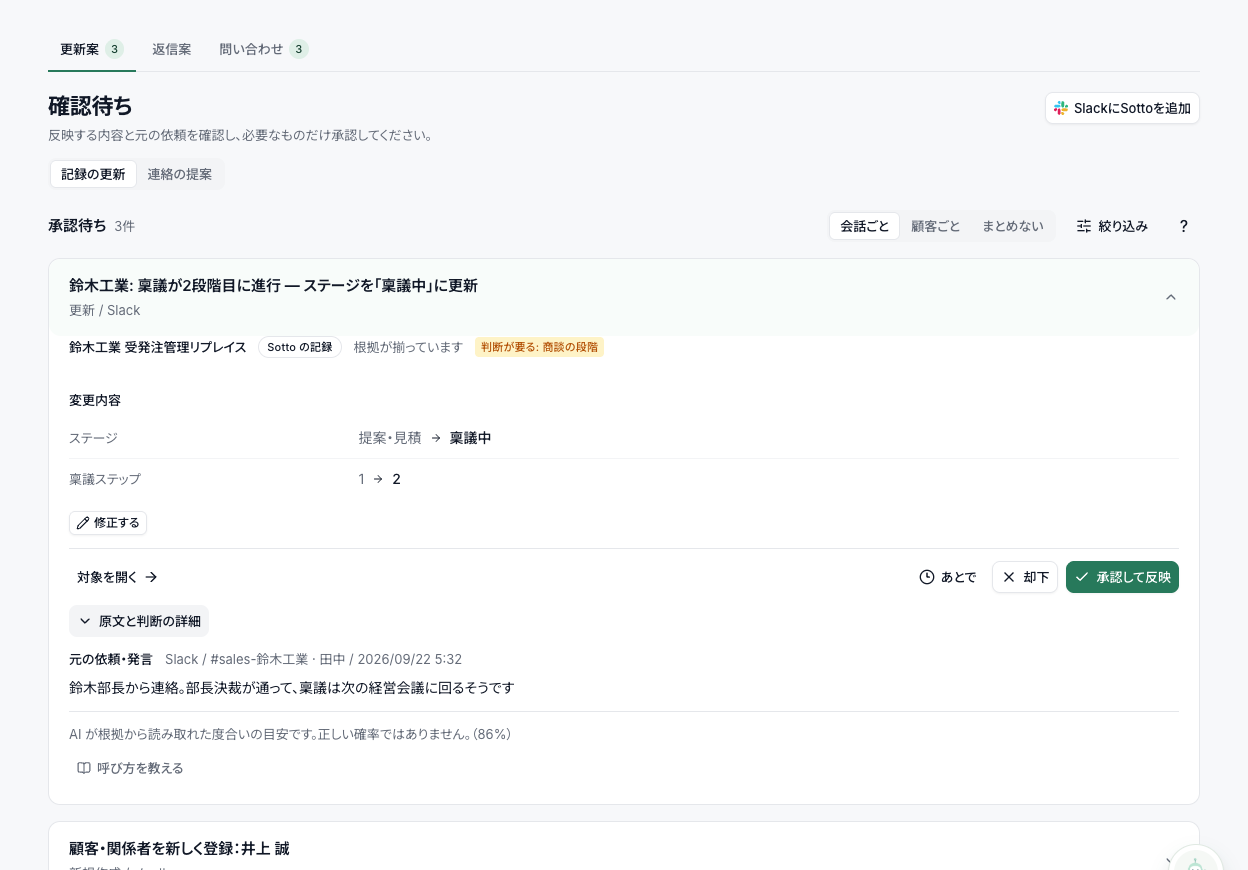
Read the customer, original statement and proposed values. For example, “we will order next month if the budget is approved” does not establish a confirmed order.
Check whether the action button applies a record change or sends a message. **Approve and apply** updates a record; **Approve and send** sends email.
## Find a proposal [#find-a-proposal]
The top of the list shows the pending count. Open **Group & filter** to group by conversation or customer, leave proposals ungrouped, or filter them.
**Review stats** shows reviewed counts, approval rates and correction trends. The unchanged-approval rate shows how often proposals were accepted without edits; rejection reasons can help identify recurring problems.
## Read the card [#read-the-card]
- **Evidence status:** Labels such as **1 source** show how many sources you can open and check. They are not a guarantee or a probability that the proposal is correct.
- **Changed values:** Before-and-after values show what will change. Unchanged fields are marked **No change**. Changes that need judgment, such as amounts, dates and deal stages, show a line from the original conversation up front.
- **Original text:** Open **View source** to check who said what and when. **Open the original message** opens the source in Slack or email. How the AI classified the message is under **Processing details**.
- **Uncertain statements:** Phrases such as “probably next month” may appear marked **(not saved as a value)** instead of being written to a field.
Development demo data. Open the original-message section to check the evidence behind a proposed change. The screenshot shows the Japanese interface.
## Approve, reject, edit or postpone [#approve-reject-edit-or-postpone]
- **Approve and apply:** Applies the record update. An email draft instead uses **Approve and send** and sends the message.
- **Reject:** Does not apply the proposal. You can provide a reason or skip that question.
- **Edit:** Edit values before approving. Required fields, numeric values and at least one retained field are validated.
- **Later:** Postpone until tomorrow or one week later. Postponed items are listed under **N snoozed** and can be returned with **Move back to awaiting review**.
## Irreversible changes and dependencies [#irreversible-changes-and-dependencies]
An irreversible proposal, such as deleting a field with its values and relationships, requires the explicit button **Run it, knowing it can't be undone**. A single-key shortcut cannot execute it.
Some proposals require another proposal to be approved first. Identical proposals from the same statement are grouped; reviewing the displayed card applies that decision to its duplicates.
## Keyboard shortcuts [#keyboard-shortcuts]
| Key | Action |
| --- | --- |
| J / K | Next / previous card |
| A | Approve |
| X | Reject |
The letter keys (J, K, A, X) only work while the card list has focus, so typing or voice input elsewhere doesn't trigger them.
## Rechecked proposals [#rechecked-proposals]
Sotto rechecks proposals that remain pending. Still-valid proposals are retained. Proposals made obsolete by new information are removed from the pending view and can be restored when needed.
See [automatic processing](/docs/en/approval-and-data) for how automatic imports, and work that goes ahead automatically when its owner has delegated it, differ from this review flow.